
Every meeting decision becomes a tracked task - automatically.
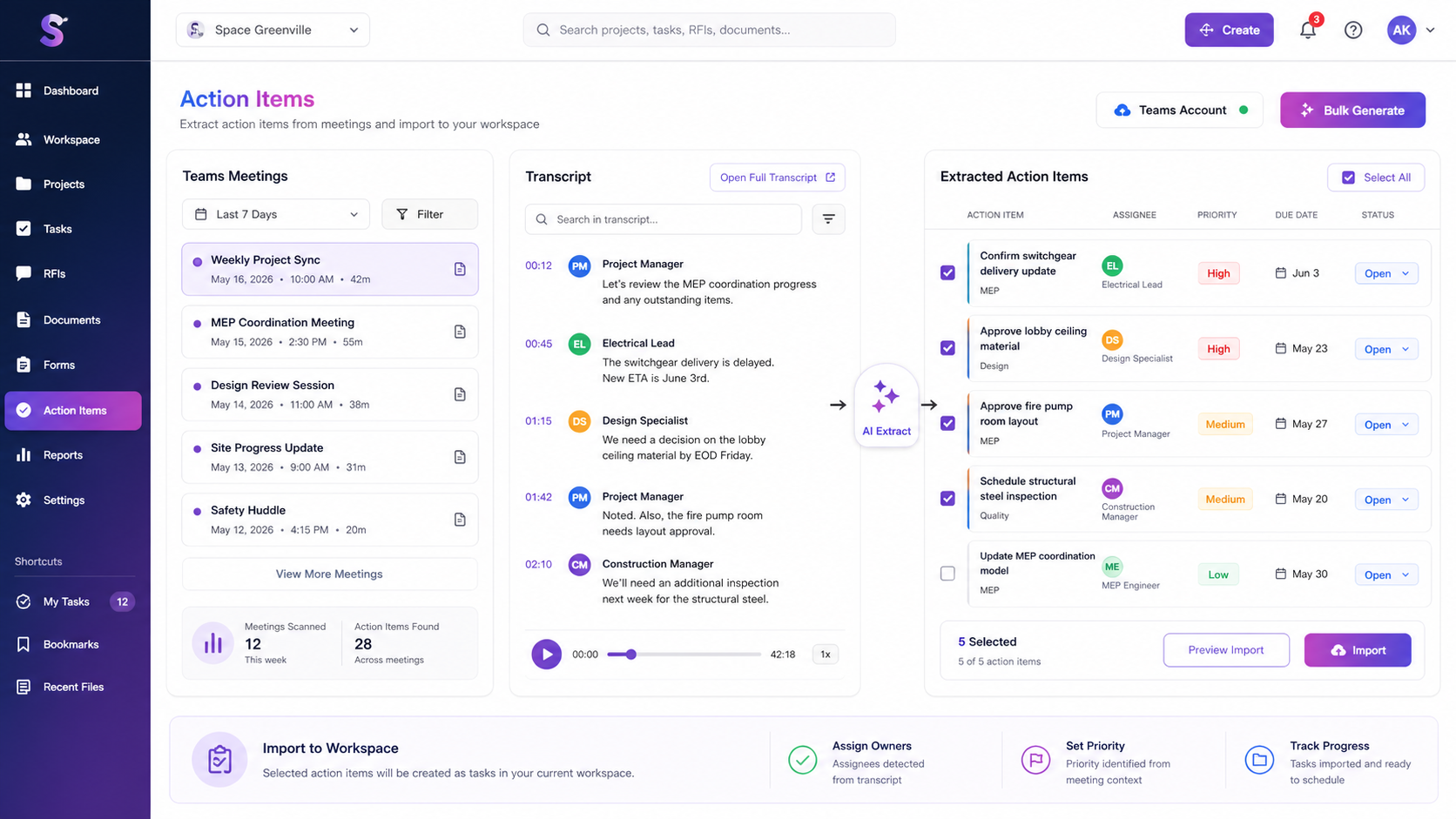
pmspace.ai connects directly to your Microsoft Teams meetings, reads the transcript, and extracts every action item using AI. No note-taking. No follow-up emails. Just tasks, ready to assign.
The problem it solves
Meeting follow-ups fail when they never become real project work.
73%
of meeting action items are never completed because they were never written down clearly, assigned, or tracked.
How it works
From transcript to tracked task in four steps.
Connect your Microsoft Teams account
Sign in once with your Microsoft account. pmspace.ai securely reads meeting transcripts without copy-paste or extra setup.
Pick your meetings
Filter by today, yesterday, last 7 days, or a custom date range. See every recorded meeting with a transcript available.
AI extracts the action items
Generate from one meeting or run bulk extraction across many. AI identifies commitments, decisions, and follow-ups with title, description, priority, and assignee.
Review, select, and import
Cherry-pick the tasks that matter, deselect the noise, and import approved items into your project workspace.
Key capabilities
Built for the messy reality of project meetings.
Teams transcript sync
Reads live transcripts through Microsoft Graph API, with no manual export needed.
Claude task extraction
Identifies action items, commitments, and follow-ups from natural conversation.
Priority detection
Urgent, high, medium, and low priority levels are assigned from meeting context.
Assignee recognition
Names mentioned in context of a task are automatically tagged as owners.
Bulk generation
Process multiple meetings in one flow with select-all and bulk generate controls.
Selective import
Review every extracted task before it enters your project and remove what you do not need.
Direct workspace import
Tasks go straight into your Space Lean workspace, ready to schedule and track.
Meeting filters
Use quick date ranges or a custom window to find the transcripts that matter.
Ready when the meeting ends
Turn your last meeting into tasks.
Eliminate the gap between what was agreed in a meeting and what actually gets done. Every decision gets an owner, a status, and a place in your schedule.