
How to Build a Construction RFI Tracker Without Paying for Procore
Build a practical RFI tracker for construction using a free spreadsheet template or Space AI workflow, with setup steps and controls that prevent overdue answers.

Summary
Key Takeaways
- 1An RFI tracker must establish ownership, response due dates, current status, and schedule/cost impact.
- 2A spreadsheet is a legitimate starting point for a small team if one person owns data discipline.
- 3Space AI is the stronger path when RFIs need connected document, task, and risk context.
- 4Formal questions and responses should remain traceable to project documents and approvals.
- 5Small GCs should scale tooling when manual chasing begins consuming project leadership time.
An unanswered Request for Information (RFI) can leave a crew waiting, trigger resequencing, delay procurement, or create a dispute about who knew what and when. A large platform may help administer that workflow, but a small general contractor does not need to buy a broad enterprise implementation before it can track RFIs responsibly.
The goal of a construction RFI tracker is simple: make every active question visible, assign an accountable responder, preserve the official answer, and flag impact before field work is disrupted. The right starting method depends on volume. Five open RFIs on one interior renovation can be controlled with a disciplined spreadsheet. Fifty RFIs across projects, linked to documents and schedule decisions, point toward a connected construction application.
The target keyword in the launch brief is RFI tracker construction, supplied at 880 monthly searches and KD 28. Verify that figure in Ahrefs or Semrush before publication, and keep the article useful regardless of ranking: the workflow below can be implemented immediately.
The cost question is not simply software subscription versus zero dollars. Manual RFI control also consumes project-engineer time, requires reliable document habits, and exposes the contractor when an overdue answer is not escalated before planned work. A small GC should begin economically, but should also count hours spent maintaining logs and searching correspondence. Once administration competes with coordination, a free connected workflow can be the more disciplined choice.
What an RFI Tracker Needs to Do
An RFI is formal project communication, not merely a chat message. The AIA G716 Request for Information form reflects the need for a documented request and response, while Autodesk's overview of RFIs explains their role in resolving information gaps during construction. A practical tracker should preserve that accountability.
Use this checklist as the minimum viable RFI register:
- Assign a unique RFI number and project identifier.
- Record subject, spec section, drawing reference, and the exact question submitted.
- Capture submitter, responsible responder, date sent, and response due date.
- Use controlled statuses: Draft, Submitted, In Review, Answered, Closed, and Void.
- Record priority and whether the RFI may affect cost, schedule, procurement, or safety.
- Store a link to the transmitted request, response, sketches, and revised documents.
- Capture answer date, approved direction, and any required change-order follow-up.
- Review open and overdue RFIs in every coordination meeting.
- Preserve a closed register at project completion.
The important discipline is separation between the log and the formal record. A tracker tells the team where an RFI stands; it should link to, rather than overwrite, the issued question and authorized answer.
Option 1: Build an Excel RFI Tracker
For one small project and a modest number of questions, a spreadsheet is entirely workable. It has almost no learning curve, can be shared with the core team, and creates a portable log at closeout.
Download the free construction RFI tracker CSV template
Set Up the Register
Open the template in Excel or your spreadsheet tool. Convert the data range into a table so that sorting and filters stay attached to the header. Freeze the top row, enable filters, and protect or clearly mark the columns used for final answers and impacts. Give the file a controlled home in the project document folder instead of sending duplicate attachments by email.
The supplied columns cover:
| Field group | Columns | Why it matters |
|---|---|---|
| Identity | Project, RFI Number, Subject, Spec Section, Drawing Reference | Makes the question searchable and traceable |
| Routing | Submitted By, Assigned To, Date Submitted, Response Due | Creates responsibility and turnaround expectation |
| Control | Status, Priority, Cost Impact, Schedule Impact | Helps meetings focus on consequences |
| Record | Question, Official Response, Response Date, Document Link | Preserves the decision path |
| Closure | Follow-up Action, Closed Date | Confirms work was incorporated |
Add Three Simple Controls
First, add conditional formatting for the response-due date: red when the due date is past and status is not Answered or Closed, amber when it is due within two business days. A late question needs to be visible before a foreman raises it in the field.
Second, create a filtered view called Open RFIs that shows Submitted and In Review items, sorted by response due date. This is the view to screen-share during the weekly owner/architect/contractor meeting.
Third, create a basic count by status and priority. A spreadsheet does not need to be an elaborate dashboard; a count of overdue high-priority questions is often enough to drive action.
Establish the Process Around the Sheet
Assign one project engineer or project manager as register owner. New RFIs receive a number only from that person, answers are entered only from issued correspondence, and closed status is set only once follow-up has been documented. Set a weekly export or PDF snapshot so changes are auditable.
This workflow costs little, but its capacity is limited. Attachment links break, people make offline copies, reminders become manual, and relationships to drawings, cost events, or schedule activities depend on careful data entry. When updating the register feels like chasing the project rather than controlling it, it is time for Option 2.
Option 2: Track RFIs in Space AI
Space AI is a better fit when the team needs RFIs connected to project context rather than confined to rows. Instead of holding only status and answer text, a construction intelligence workflow can associate the question with the relevant document, owner, activity, risk, and follow-up work. This is useful for small GCs as soon as several concurrent decisions begin influencing procurement or the look-ahead schedule.
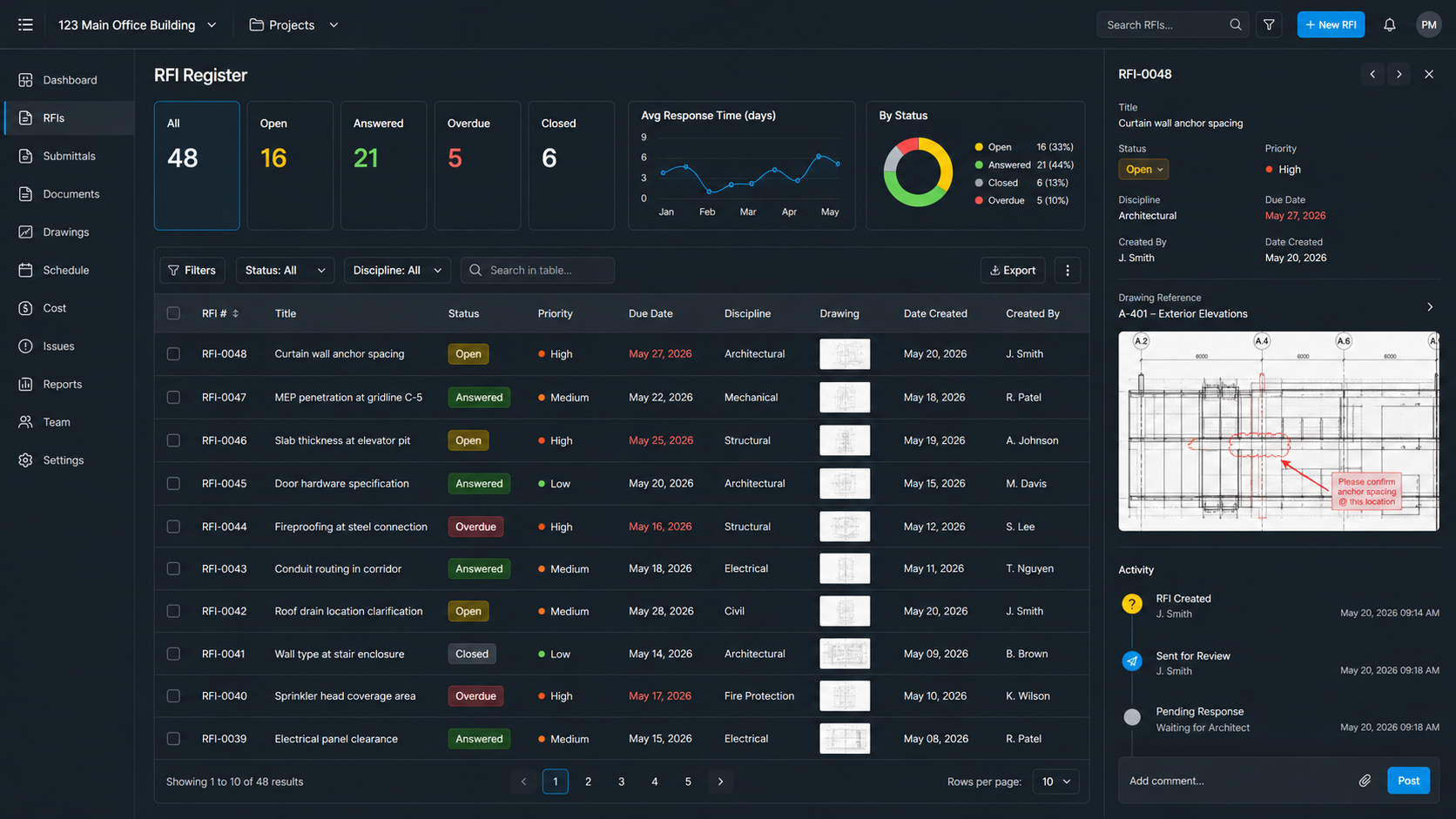
The featured interface image for this article illustrates the working view: an RFI register with due dates and status, a selected question with supporting drawing context, and an activity history for follow-up.
Step 1: Create the Project and RFI Register
Begin with one live project. Define the project team and the people who may submit, answer, review, or close questions. Create the RFI workflow with the same core fields used in the spreadsheet: number, title, drawing/spec reference, owner, due date, impact, attachments, response, and status. Keeping familiar fields reduces training friction.
Step 2: Submit Questions with Context
When a field issue arises, enter a clear question and attach or link the supporting plan excerpt, photo, specification, or prior instruction. State the decision required rather than describing only the problem. A good RFI asks, for example, which rated assembly governs at a conflicting penetration, not simply that a conflict exists.
Step 3: Route Responsibility and Due Dates
Assign the question to the responsible design or owner representative and set a required response date based on the look-ahead schedule. Mark the consequence if no response arrives: blocked installation, material release at risk, potential cost, or no immediate schedule effect. This lets the project manager focus attention where delay has consequence.
Step 4: Review and Escalate Open Items
Use an open/overdue view during project meetings. Review high-impact items first, confirm that each has an owner, and escalate due dates before work is blocked. Where a response changes scope, link the follow-up to commercial review rather than silently treating it as field direction.
Step 5: Close with an Official Answer
An RFI is not complete just because someone replied. Store the official response, identify drawings or work packages affected, record follow-up actions, and close only after direction has entered the project workflow. The Construction Specifications Institute is a useful authority for document and specification practice when defining your internal controls.
Step 6: Learn from the Register
At project close, examine response time, repeated causes, high-impact disciplines, and questions that resulted in cost or schedule change. A connected system helps a growing contractor see patterns: unclear design areas, recurring trade coordination gaps, or approvals that consistently arrive late.
Set up your RFI tracker in Space AI -- free ->
Excel Template vs. Space AI
| Consideration | Excel template | Space AI |
|---|---|---|
| Initial setup | 15-30 minutes from the download | Set up project, roles, and workflow |
| Learning curve | Familiar to nearly every office user | Requires brief workflow onboarding |
| Cost to begin | Spreadsheet tool already available | Free starting path |
| Attachments and context | Links maintained manually | Designed for connected project records |
| Due-date follow-up | Conditional formatting and human reminders | Centralized workflow visibility |
| Multi-project reporting | Manual consolidation | Better suited to growing operations |
| Scalability | Good for low RFI volume | Better when RFI impact crosses workflows |
When a Small GC Should Upgrade from a Sheet
Keep the spreadsheet while it is accurate, owned, and reviewed. Move toward a connected tracker when questions are routinely overdue, project leaders spend time consolidating logs, the team cannot easily locate source answers, or RFIs frequently turn into schedule and cost action. This is not about purchasing software for its own sake. It is about preserving enough context to deliver work without preventable waiting and argument.
Procore is one recognized route for formal construction administration, but it is not the only way a small contractor can run an accountable RFI process. Begin with discipline, use the free template if volume is light, and adopt connected construction intelligence as the decisions become too important to chase manually.