
AI Form Builder for Construction: Stop Rebuilding the Same Forms
Learn how an AI form builder helps construction teams produce consistent daily reports, inspections, and field forms without rebuilding templates in Word or Excel.

Summary
Key Takeaways
- 1Construction PMs lose useful coordination time when routine field forms are recreated manually.
- 2An AI form builder can propose structure, validations, and routing while a human confirms requirements.
- 3A daily report is a practical first form because teams complete it frequently and rely on its record.
- 4Standardized field capture improves searchability and makes trends easier to analyze.
- 5Small and mid-size GCs gain the most when they need repeatable processes without enterprise administration.
A project manager should not have to rebuild the same daily report every time a project starts. Yet across small and mid-size construction firms, forms often begin as copied Word documents, old Excel sheets, or PDFs whose fields no longer match today's work. Someone fixes the header, adds a safety box, sends a new version, and then spends the following weeks reconciling incomplete answers and inconsistent files.
That is expensive in an unglamorous way. Ten minutes spent adjusting a form, explaining which version to use, or reading free-text updates does not look like a major project loss. Repeat it across daily reports, inspections, material receipts, RFIs, toolbox talks, equipment checks, and closeout lists, and capable project staff spend hours administering documents instead of resolving work.
An AI form builder for construction is useful when it shortens that setup cycle and improves the data collected. The keyword brief for this article supplies 590 monthly searches and KD 22; validate those metrics in your Ahrefs or Semrush account immediately before release. More importantly, validate the operational promise by building one form your field team already uses every day.
What an AI Form Builder Does Differently
A conventional form builder gives the user a blank canvas and a menu of fields. It can be helpful, but the project manager still decides every prompt, required value, status option, approval route, and reporting structure. Copying old documents saves time until inherited mistakes become the new standard.
An AI-assisted builder begins with intent. A PM can request a daily report for a commercial interior renovation, a concrete pre-pour inspection, or a subcontractor safety observation. The system can propose sections, field types, required checks, standard response choices, and routing steps. A responsible user then reviews the output against contract, company, safety, and quality requirements before publishing it.
In construction, the benefit is not merely faster design. Structured fields create information that is easier to act on:
- Crew counts can be summarized by day and trade instead of extracted from paragraphs.
- Delays can be classified by cause and routed to the right owner.
- Photos can be required with location, activity, and date context.
- Safety observations can be escalated promptly rather than buried in a report.
- Weather, equipment, material delivery, and completed-work data can be compared over time.
Use AI for acceleration and consistency, not unchecked authority. For safety records, regulatory reporting, contract notices, and personnel data, a qualified person should validate the form and its retention rules. The OSHA recordkeeping forms and guidance and the NIST AI Risk Management Framework are useful reference points for teams setting responsible controls around regulated information and AI-enabled workflows.
Step by Step: Build a Daily Report Form in Space AI
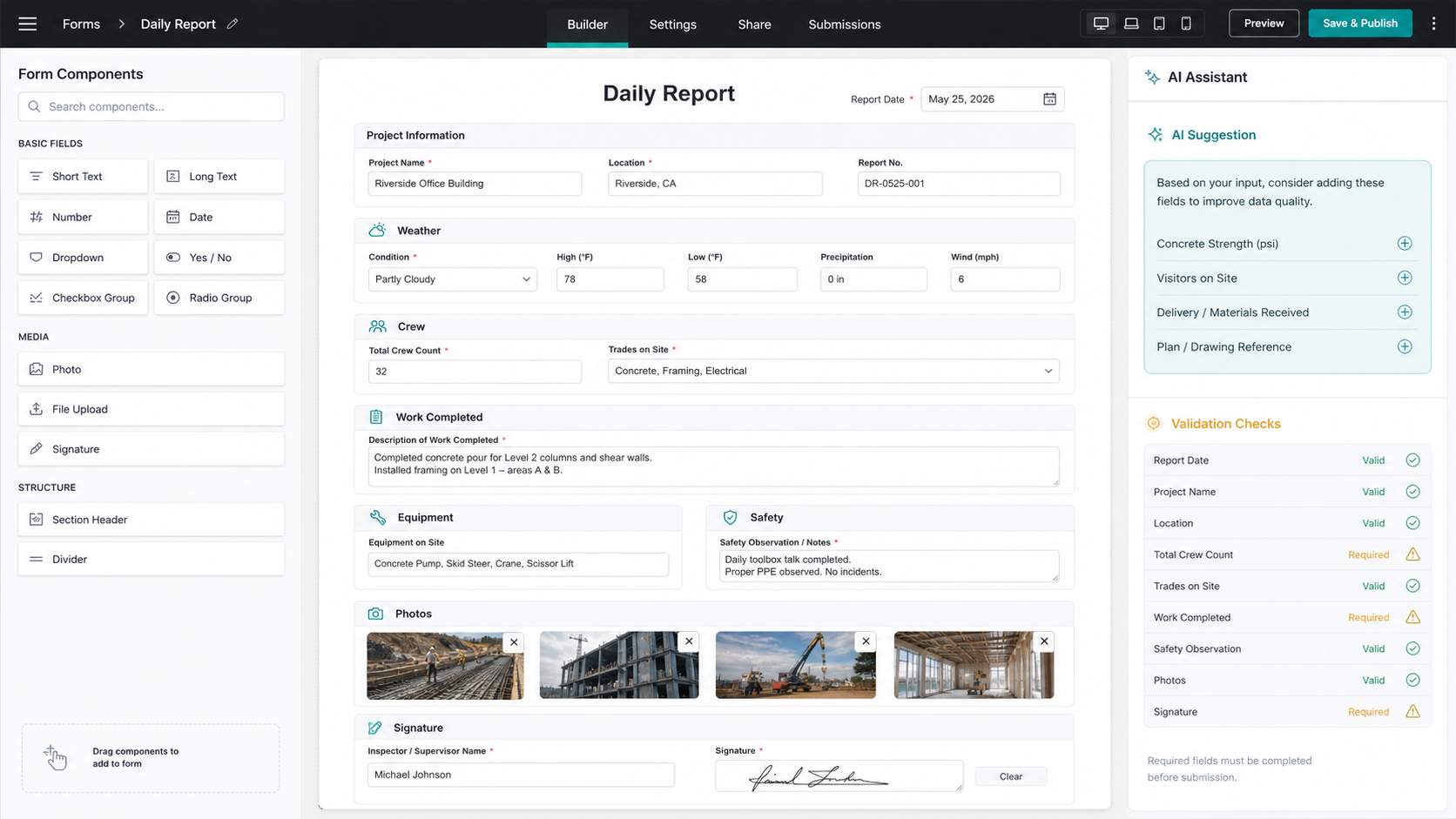
A daily field report is the ideal first AI-generated construction form. It is repetitive, important to project memory, and immediately exposes whether a form is convenient for the superintendent to complete. The featured interface image above shows the intended layout: a practical form canvas for daily reporting, common construction fields, and AI-supported validation suggestions.
Step 1: State the Form's Purpose
Start with a precise instruction: "Create a daily field report for a small commercial general contractor. Capture weather, workforce by trade, hours worked, completed activities, deliveries, equipment, delays, safety observations, quality issues, photos, and superintendent sign-off."
Purpose matters because a daily report is not an inspection checklist or a timecard. It records what occurred on site and what affected progress. Keep the first form focused on that record rather than filling it with every possible project question.
Step 2: Review the Suggested Sections
The generated draft should be organized into short, usable sections:
| Section | Recommended field types | Required? |
|---|---|---|
| Project and report date | Project selector, date, superintendent | Yes |
| Conditions | Weather choice, temperature, site condition note | Yes |
| Workforce | Repeatable trade, headcount, hours | Yes |
| Work performed | Work area, activity, quantity or progress, notes | Yes |
| Deliveries and equipment | Repeatable entries with status | When applicable |
| Issues and delays | Category, description, impact, action owner | When any occur |
| Safety and quality | Observation, action taken, photo | Yes/conditional |
| Evidence and approval | Photo uploads, signature, submitted time | Yes |
Remove fields your crew will not use and add project-specific requirements only where they have an operational owner. Every unnecessary required field is an invitation for unreliable answers.
Step 3: Set Required Fields and Smart Validation
Require the information that establishes a trustworthy project record: report date, person submitting, conditions, workforce, completed work, safety confirmation, and sign-off. Use conditional logic so an entered delay requests an impact category and responsible follow-up; a safety observation requests corrective action and a photo; a delivery problem asks for supplier and affected activity.
AI suggestions are helpful here because they can identify missing logic, such as a delay without an owner or a photo without a location. The PM still decides what is required and checks that the form reflects project policy.
Step 4: Establish Routing and Review
Choose who receives the completed daily report. For a small GC, that may be the project manager and superintendent, with automatic visibility for an operations leader only when a delay, safety concern, or quality exception is reported. Avoid sending every routine entry to every stakeholder; alert fatigue makes important issues less visible.
Keep a consistent revision process. If you alter a live form, record the change date and reason so that reports remain interpretable across the project.
Step 5: Test It on a Phone Before Publishing
The field is not a desktop demonstration. Ask a superintendent to fill the form on a mobile device while standing in ordinary working conditions. Check that repeatable crew entries are fast, photographs upload cleanly, labels are plain, and signature/submission can be completed without hunting through unnecessary fields. A form that takes too long will produce late or incomplete information no matter how sophisticated its design.
Step 6: Use Structured Reports to Improve Decisions
Once reports are submitted consistently, the data begins to matter beyond storage. A PM can review delay categories, see repeated delivery issues, compare workforce against planned work, or retrieve the daily evidence behind a change discussion. This is where AI form building becomes construction intelligence: not simply creating a prettier form, but making recurring field signals usable.
Build your first form free -- no account needed for the demo ->
10 Construction Forms You Can Build in Under Five Minutes Each
The exact review and approval time will vary; the initial draft for each common form can be generated quickly when the purpose and required fields are clear.
1. Daily Field Report
Capture conditions, crew by trade, activities completed, equipment, deliveries, delays, safety notes, photos, and superintendent sign-off. This should be the first template because it is used frequently and builds a searchable project history.
2. Safety Observation Form
Record the location, hazard category, immediate control, responsible party, photo, corrective action, and closeout verification. Review against your safety program and regulatory obligations before use; an AI draft is not safety compliance approval.
3. Quality Inspection Checklist
Create a checklist for a defined scope such as drywall close-in, waterproofing, or finishes. Include drawing/specification reference, inspection points, pass/fail/not-applicable choices, deficiency evidence, assigned correction, and reinspection acceptance.
4. Material Delivery Receipt
Capture supplier, purchase order, material, quantity received, condition, storage location, rejected items, photos, and receiving signature. Consistent receipt data helps teams identify short deliveries before an installation date is at risk.
5. Equipment Inspection Log
Record equipment identity, operator, daily condition checks, defects, out-of-service status, corrective action, and verification. Have equipment and safety leads review required checks for each equipment type.
6. Toolbox Talk Attendance Record
Include topic, presenter, date, work area, attendees, questions raised, acknowledgements, and associated documentation. Keep this aligned with company safety practice and the requirements applying to your site.
7. RFI Intake Form
Ask for project, work area, drawing/specification references, clear question, proposed solution if allowed, urgency, potential impact, attachments, and responsible reviewer. An intake form improves the quality of questions before they enter an RFI register.
8. Subcontractor Progress Update
Capture package, planned work, completed work, crew, constraints, material needs, upcoming activities, safety/quality issues, and requests for support. Consistent inputs make weekly planning discussions more useful.
9. Change Event Notice
Record the originating issue, instruction or document reference, affected scope, potential schedule/cost impact, notice date, supporting evidence, and commercial reviewer. Formal contractual notice still requires human review against the agreement.
10. Punch List Walk Form
Create room/location-based entries with trade, issue type, photo, assignee, due date, completion proof, and verifier. A mobile-first punch form makes closeout less dependent on retyped notes and scattered images.
The Associated General Contractors of America provides broader industry education and resources; combine relevant industry practice with your contracts and internal policies when standardizing forms.
Who This Approach Is For
AI form building is a strong fit for small to mid-size general contractors whose people repeat the same field and office capture every project but do not have a full-time systems administrator. It can help a PM establish consistent reporting quickly, help a superintendent submit usable information, and help an operations lead see recurring patterns across work.
It is not a promise that an out-of-the-box template should govern complex enterprise compliance, union, safety, owner, or contractual processes without review. Enterprise organizations typically require controlled template libraries, integration architecture, legal review, security governance, and retention policies. An AI builder can assist that work; it does not remove it.
Stop Building Blank Forms and Start Building Project Memory
Forms are where much of a construction project's memory begins. When they are inconsistent, the team inherits incomplete records and slow decisions. When they are fast to create, clear to complete, and structured for analysis, everyday reporting becomes an advantage.
Start with the daily report, test it with the field, and only then expand into the forms that address your most repeated friction. The time saved on document formatting is useful; the consistent project context collected afterward is the real return.